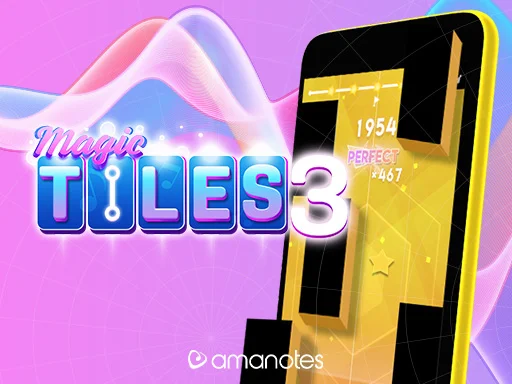
Magic Tiles 3


Rating:
4.25
Played:
14,334
What Is Magic Tiles 3?
Magic Tiles 3 is a rhythm game where you tap dark tiles in time with the music, hold long notes when they appear, and avoid missing the lane completely. The rule set is simple, but the pace changes quickly once a song gains speed. That mix of easy onboarding and rising pressure is the reason the game still works so well. A beginner can understand the goal in a few seconds, but lasting through a fast section requires focus, timing, and calm hands.
The game succeeds because every action has immediate feedback. Accurate taps keep the melody flowing, missed notes break momentum at once, and long streaks make improvement feel measurable. Amanotes built the wider mobile version around that clean loop, then layered in recognizable songs, challenge systems, battle rooms, and frequent updates. The result is a music game that feels accessible on the surface while still giving players a real skill ceiling to chase.
Why the loop stays engaging
Magic Tiles 3 always tells you exactly what to do, so the tension comes from execution rather than confusion. Your eyes track the notes, your ears follow the beat, and your fingers try to stay synchronized as the pattern becomes denser. A smooth run can feel almost meditative, then the next phrase suddenly pushes you into a higher level of concentration. That shift between control and pressure is the center of the experience.
Play Magic Tiles 3 in Your Browser
This game fits browser play extremely well because it does not need a long setup. On Block Crush, you can load the page and start a run within moments, which is ideal for short breaks or repeated attempts. The wider browser scene around Magic Tiles 3 shows the same appeal: fast access, quick restarts, and an interface built around immediate input instead of heavy menus.
Why browser play feels natural
Rhythm games benefit from convenience. If you can open a tab and begin at once, you spend more time learning note patterns and less time navigating setup screens. That matters for a game like Magic Tiles 3, where progress often comes from short, focused sessions rather than one long campaign. A modern browser, stable audio, and a distraction-free screen are usually all you need.
How to get a smoother session
Turn on sound if possible, since the beat helps with timing even when you are reading the notes visually. Full-screen mode can also help on desktop because it keeps the lanes centered and reduces stray clicks. If a page feels delayed, close heavy tabs in the background and reload before starting another serious run.
Controls and Timing Basics
Magic Tiles 3 uses simple inputs, but precision matters on every note. Most browser builds rely on clicking, tapping, and holding rather than complex button combinations. That makes the game easy to pick up, yet it also means mistakes are very visible. When you improve, you can feel that the improvement came from rhythm and consistency, not from learning a hidden system.
Desktop controls
On desktop, the usual method is the mouse. Click the tiles as they reach the strike area and hold when a long note continues downward. Some versions also support keyboard-based lane input, often through arrow keys or WASD, but mouse control is enough for most players. The key is to stay relaxed and avoid reacting too early.
Touch controls and useful habits
On phones and tablets, touch input feels very natural because the game’s design was shaped by mobile play. Tap the lower part of each lane, keep contact on sustained notes, and try to watch the hit area instead of the very top of the screen. Start with easier songs, learn the visual rhythm, and only move to faster tracks when your hands stop feeling rushed. Long combos usually come from composure, not panic.
Background and Mobile Success
Magic Tiles 3 comes from Amanotes, a publisher focused on music games. On the company’s product page, Amanotes calls it its most beloved piano hit game and says it has reached more than 120 million music fans. The mobile store listings explain why it spread so widely: the game mixes easy lane tapping with a large music catalog, online competition, custom battle options, and special modes that add extra instruments or faster challenge play.
From piano-tile idea to long-running platform
The game belongs to the broader piano-tile tradition, where players react to descending notes under increasing speed. Magic Tiles 3 expanded that format by tying it to recognizable songs and social competition. Official descriptions mention battle mode, band mode, and regularly refreshed music content, which helped the title become more than a one-time mobile fad. Instead of relying on a single trick, it kept giving players new tracks and new reasons to compare scores.
Why people keep returning
Each song has its own rhythm pattern, so improvement stays interesting. Some tracks reward patience, some demand speed, and others punish hesitation the moment your focus slips. That variety keeps the game replayable even though the basic controls never become complicated.
Common Questions
Is Magic Tiles 3 beginner friendly?
Yes. The main rule is clear from the first round, and the difficulty rises gradually as song speed and note density increase.
Can I play it without downloading the mobile app?
Yes. On Block Crush, you can launch the browser version directly and start playing without a separate install.
Do I need real piano skills?
No. The game rewards rhythm, reaction, and consistency rather than formal music training.
What is the best habit for higher scores?
Keep your eyes near the timing line. Players often miss because they react too early while looking too high on the screen.
Does it work on mobile browsers?
Usually yes, as long as your browser is current and your connection is stable enough to load the page cleanly.
Why does a run feel much harder near the end?
The game is designed to raise pressure over time. Faster sections and denser note groups test whether you can stay calm after a strong start.
Are the browser and mobile versions exactly the same?
No. The mobile app often includes more events and platform features, while the browser version focuses on instant access and quick sessions.
Start Your Next Run
Magic Tiles 3 remains a browser pick because it turns a simple music idea into a focused skill test. If you want a rhythm game with clear rules, direct controls, and room to improve, it is easy to launch and revisit on Block Crush.



Comments
Loading comments…